(TODO)Flutter学习笔记
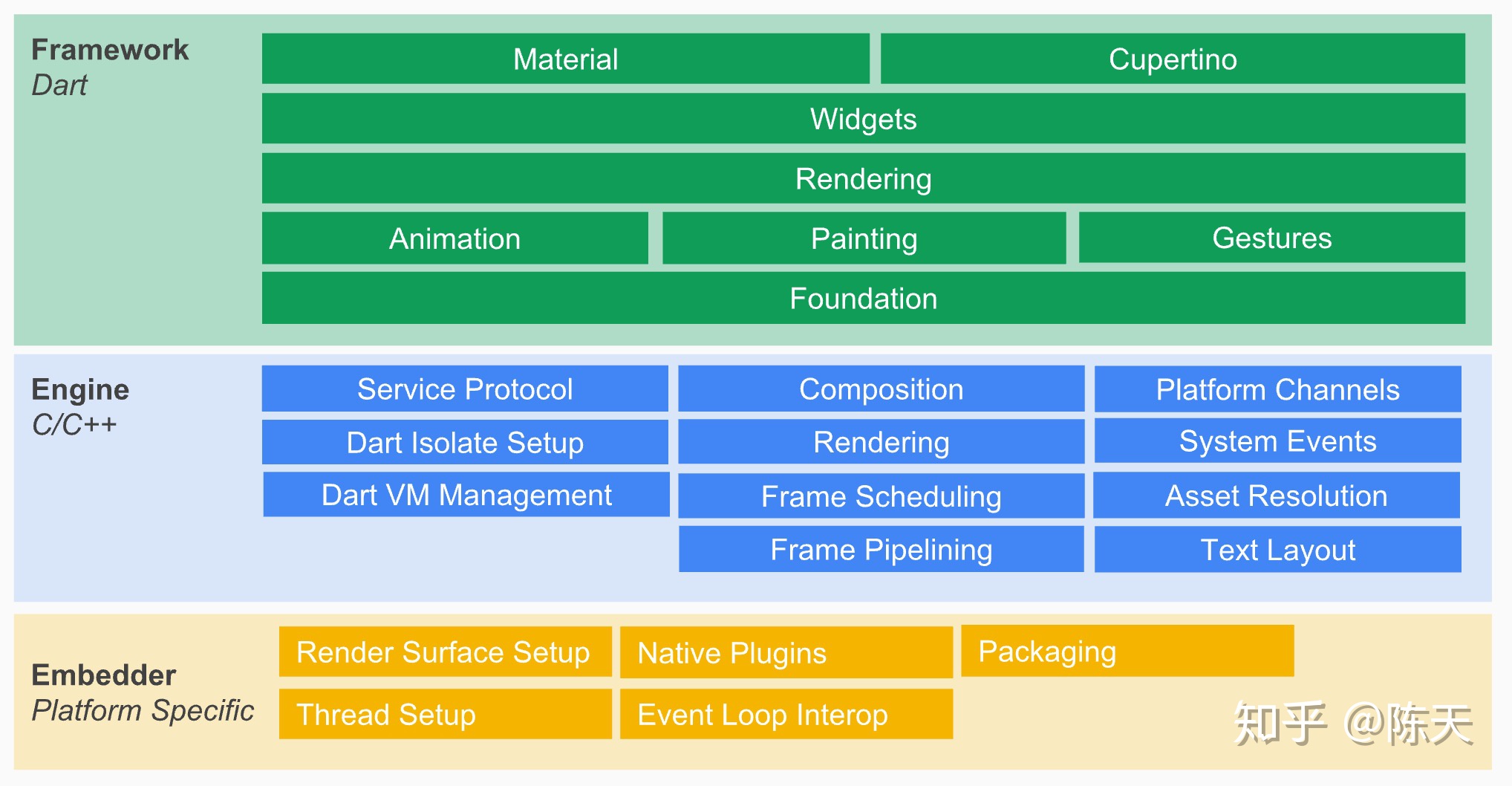
这是摘自网上的 Flutter 架构图:
名词概念
Dart 的 isolate
Flutter 组件相关的名词
trailing
tile
Material Design
这是 Google 的 UI 交互设计规范,据此衍生出了一批 UI 组件库,而 Flutter 本身就集成了这类组件,详见Material Library。
设计理念
文件结构
常用命令
1 | |
技术方案
如何安装多个版本的 Dart SDK
如何查找包
如何引入包
pubspec.yaml 中配置依赖的包和版本,可以把这个理解为 package.json
然后执行如下命令:
1 | |
然后在代码文件中 import 即可:
1 | |
添加页面元素
查询某个控件的配置信息
绑定交互事件
读取本地文件
比如读取本地的 txt 文本
存储用户数据
比如上一次的阅读进度、历史书单等等
路由
自定义图标
打包 iOS 安装包
开发调试
DevTools
https://flutter.dev/docs/development/tools/devtools
常见问题
总结
用通过 UI 组件库写前端的思维去写 Flutter
整个编写过程感觉和用 UI 库(比如 MintUI)写前端页面极其相似。
Flutter 是一个完成度很高的框架
这意味着很多东西都是已经约定好的,很多类、方法都是固定的,你只需要按照既有规范,写填空题即可。
文档&资料
(精)cookbook(基本上常用的功能这里都介绍了,包括存储、网络、表单、动画等等):
https://flutter.dev/docs/cookbook
codelab(起步的第一个 APP 可以参考这个来):
https://flutter.dev/docs/codelabs
(TO BE READ)Flutter Live 2018:
https://codelabs.developers.google.com/flutterlive/
《Flutter 实战》:
https://book.flutterchina.club/
Widget:
https://api.flutter.dev/flutter/widgets/widgets-library.html
flutter_echarts:
https://github.com/entronad/flutter_echarts
优秀效果
可以在 gallery 中查看各种效果:
https://flutter.github.io/samples/#
3D 可视化:
https://flutter.github.io/samples/web/github_dataviz/#/
俄罗斯方块:
https://github.com/boyan01/flutter-tetris
图表库-flchart:
https://github.com/imaNNeo/fl_chart
图表库-Graphic:A grammar of data visualization and Flutter charting library:
https://github.com/entronad/graphic
K 线图:
https://github.com/OpenFlutter/k_chart
https://github.com/trentpiercy/flutter-candlesticks
ECharts:
https://github.com/entronad/flutter_echarts
电子书阅读器(比较新):
https://github.com/JideGuru/FlutterEbookApp