技术拆解-股权洞察与企业架构

业务说明

股权洞察

分为了左右两部分:左边是股权分布,右边是企业投资情况分布。

技术储备

D3.js

descendants

merge

tree

nodeSize

separation

SVG

滤镜(feComponentTransfer、filter)

左右树(我自己造的名词)

接口

请求单个节点

查企业股权数据

接口维护人员:范智强

https://kuaicha.10jqka.com.cn/open/app_business/v1/graph/enterprise_equity_level?shareholder_org_id=T000025753&invest_org_id=T000025753&initial=true&level=1&cur_tracer_id=a30a40f2

以股权洞察为例:

1
2
3
4
5
6
7
8
9
10
11
12
13
14
15
16
17
18
19
20
21
22
23
24
25
26
27
28
29
30
31
32
33
34
35
36
37
38
39
40
41
42
43
44
45
46
47
48
49
50
51
52
53
54
55
56
57
58
59
60
61
62
63
64
65
66
67
68
69
70
71
72
73
74
75
76
77
78
{
status_code: 0,
status_msg: "股权洞察图谱",
data: {
enterprise_share: [{
is_org: 1,
listed: true,
children: [{
is_org: 1,
listed: false,
children: null,
name: "北京凯士奥信息咨询有限公司",
photo: "",
id: "T000044234",
has_child: false,
tag: "",
parent_orgid: "T000025753",
ratio: "9.8900"
},
{
is_org: 1,
listed: false,
children: null,
name: "中国证券金融股份有限公司",
photo: "",
id: "T000073058",
has_child: false,
tag: "",
parent_orgid: "T000025753",
ratio: "1.1000"
}
],
name: "浙江核新同花顺网络信息股份有限公司",
photo: "//e.thsi.cn/tlogo/1ce9ecfeb1a0b5377bc40805d1410398",
id: "T000025753",
has_child: true,
tag: "A股",
parent_orgid: null,
ratio: null
}],
enterprise_invest: [{
is_org: 1,
listed: true,
children: [{
is_org: 1,
listed: false,
children: null,
name: "浙江同花顺网络科技有限公司",
photo: "",
id: "T000113849",
has_child: true,
tag: "",
parent_orgid: "T000025753",
ratio: "100.0000"
},
{
is_org: 1,
listed: false,
children: null,
name: "浙江同花顺智能科技有限公司",
photo: "",
id: "T004828603",
has_child: true,
tag: "",
parent_orgid: "T000025753",
ratio: "100.0000"
}
],
name: "浙江核新同花顺网络信息股份有限公司",
photo: "//e.thsi.cn/tlogo/1ce9ecfeb1a0b5377bc40805d1410398",
id: "T000025753",
has_child: true,
tag: "A股",
parent_orgid: null,
ratio: null
}]
}
}

请求多个节点

数据结构

程序数据结构

d3.hierarchy

Node

是 D3 的HierarchyNode<Datum>对象
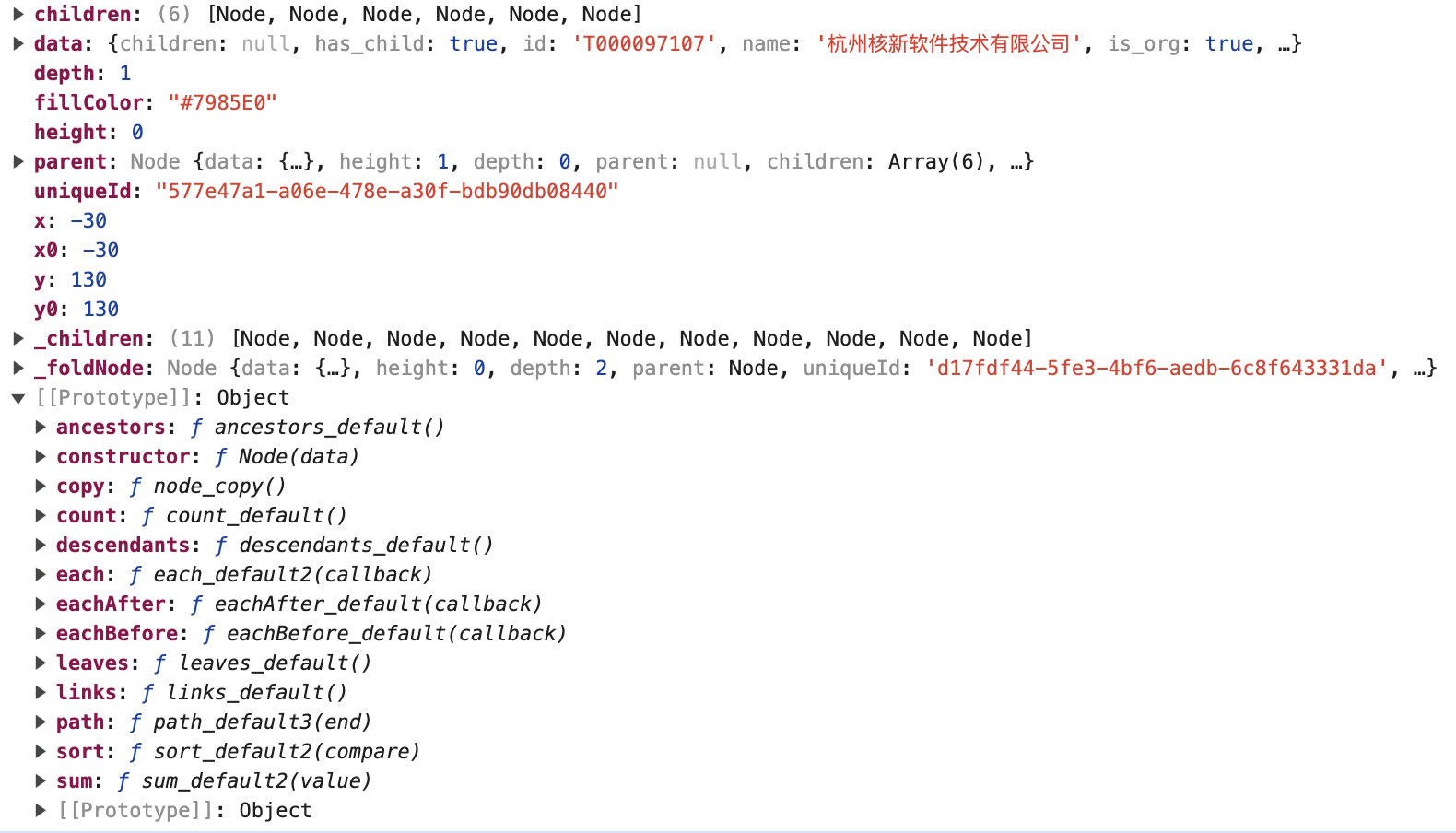
node

HierarchyNode
1
2
3
4
5
6
7
8
9
10
11
12
13
14
15
16
17
18
19
20
21
22
23
24
25
26
27
28
29
30
31
32
33
34
35
36
37
38
39
40
41
42
43
44
45
46
47
48
49
50
51
52
53
54
55
56
57
58
59
60
61
62
63
64
65
66
67
68
69
70
71
72
73
74
75
76
77
78
79
80
81
82
83
84
85
86
87
88
89
90
91
92
93
94
95
96
97
98
99
100
101
102
103
104
105
106
107
108
109
110
111
112
113
114
115
116
117
118
119
120
121
export interface HierarchyNode<Datum> {
/**
* The associated data, as specified to the constructor.
*/
data: Datum;

/**
* Zero for the root node, and increasing by one for each descendant generation.
*/
readonly depth: number;

/**
* Zero for leaf nodes, and the greatest distance from any descendant leaf for internal nodes.
*/
readonly height: number;

/**
* The parent node, or null for the root node.
*/
parent: this | null;

/**
* An array of child nodes, if any; undefined for leaf nodes.
*/
children?: this[] | undefined;

/**
* Aggregated numeric value as calculated by `sum(value)` or `count()`, if previously invoked.
*/
readonly value?: number | undefined;

/**
* Optional node id string set by `StratifyOperator`, if hierarchical data was created from tabular data using stratify().
*/
readonly id?: string | undefined;

/**
* Returns the array of ancestors nodes, starting with this node, then followed by each parent up to the root.
*/
ancestors(): this[];

/**
* Returns the array of descendant nodes, starting with this node, then followed by each child in topological order.
*/
descendants(): this[];

/**
* Returns the array of leaf nodes in traversal order; leaves are nodes with no children.
*/
leaves(): this[];

/**
* Returns the shortest path through the hierarchy from this node to the specified target node.
* The path starts at this node, ascends to the least common ancestor of this node and the target node, and then descends to the target node.
*
* @param target The target node.
*/
path(target: this): this[];

/**
* Returns an array of links for this node, where each link is an object that defines source and target properties.
* The source of each link is the parent node, and the target is a child node.
*/
links(): Array<HierarchyLink<Datum>>;

/**
* Evaluates the specified value function for this node and each descendant in post-order traversal, and returns this node.
* The `node.value` property of each node is set to the numeric value returned by the specified function plus the combined value of all descendants.
*
* @param value The value function is passed the node’s data, and must return a non-negative number.
*/
sum(value: (d: Datum) => number): this;

/**
* Computes the number of leaves under this node and assigns it to `node.value`, and similarly for every descendant of node.
* If this node is a leaf, its count is one. Returns this node.
*/
count(): this;

/**
* Sorts the children of this node, if any, and each of this node’s descendants’ children,
* in pre-order traversal using the specified compare function, and returns this node.
*
* @param compare The compare function is passed two nodes a and b to compare.
* If a should be before b, the function must return a value less than zero;
* if b should be before a, the function must return a value greater than zero;
* otherwise, the relative order of a and b are not specified. See `array.sort` for more.
*/
sort(compare: (a: this, b: this) => number): this;

/**
* Invokes the specified function for node and each descendant in breadth-first order,
* such that a given node is only visited if all nodes of lesser depth have already been visited,
* as well as all preceding nodes of the same depth.
*
* @param func The specified function is passed the current node.
*/
each(func: (node: this) => void): this;

/**
* Invokes the specified function for node and each descendant in post-order traversal,
* such that a given node is only visited after all of its descendants have already been visited.
*
* @param func The specified function is passed the current node.
*/
eachAfter(func: (node: this) => void): this;

/**
* Invokes the specified function for node and each descendant in pre-order traversal,
* such that a given node is only visited after all of its ancestors have already been visited.
*
* @param func The specified function is passed the current node.
*/
eachBefore(func: (node: this) => void): this;

/**
* Return a deep copy of the subtree starting at this node. The returned deep copy shares the same data, however.
* The returned node is the root of a new tree; the returned node’s parent is always null and its depth is always zero.
*/
copy(): this;
}
1
2
3
// 转换数据结构
this.leftRoot = d3.hierarchy(this.originLeftNodes);
this.rightRoot = d3.hierarchy(this.originRightNodes);

额外扩展的字段

  • maxLeft:左侧最大节点数

  • maxRight:右侧最大节点数

  • specialType:特殊节点,比如’fold’

  • _foldNode:折叠的节点

  • _children:子节点数据,可以用来判断在点击时要不要请求后端数据

  • photo:logo 图片

  • x0:记录上一次的位置

  • y0:记录上一次的位置

更多

程序流程

  • 请求接口获取数据
  • 将数据拆分为左右两部分
  • 将数据处理为带有更多的格式
  • 通过 d3.hierarchy 将数据处理为层级结构
  • 添加缩放事件
  • 设置画布的样式

关键函数和方法

请求数据

fetchData()

展开子节点

update() -> on(‘click’)->this.clicked(d)->this.fetchData(d).then((d) => doNext());
fetchData(d)

展开更多节点

通过foldLimit配置项来控制展开的数量,每次都会额外展开foldLimit个节点。

fetchData()中的特殊处理:

1
2
3
4
5
if (res.children.length > foldLimit) {
res.children.push({
specialType: 'fold',
});
}
1
2
3
if (d.children.filter((d) => d.data.specialType === 'fold').length !== 0) {
d._foldNode = d._children.pop();
}

显示全部

expand():全流程,包含取数、数据加工、渲染

fullExpand():纯数据加工,不包含取数

fetchEquityData():取数,获取股权数据,这里做了合并请求(过滤尚未请求数据的节点,拼接 url 参数,一次性请求)

update():渲染

放大缩小

1
2
3
4
5
this.viewport.scale(0.7);

this.scaleK = 0.7~2;

this.zoomHandler(this.scaleK);

聚焦

截图

只看上市

恢复默认

切换黑白风格

如何实现自定义事件?

1
2
3
4
5
6
7
8
9
10
11
12
13
14
15
16
17
18
19
20
21
22
23
24
25
26
27
28
29
on(eventName, callback) {
if (!this.handler[eventName]) {
this.handler[eventName] = [];
}

this.handler[eventName].push(callback);
}

off(eventName) {
if (this.handler[eventName]) {
this.handler[eventName] = null;
}
}

once(eventName, callback) {
const wrapper = (...args) => {
callback(...args);
this.off(eventName);
};
this.on(eventName, wrapper);
}

emit(eventName, ...args) {
if (this.handler[eventName]) {
this.handler[eventName].forEach((cb) => {
cb(...args);
});
}
}

布局

用的d3.tree()

1
2
3
4
5
6
7
// 控制点的间距
function separation(a, b) {
return a.parent == b.parent ? 1 : 1;
}

// TODO:硬编码,布局的width, height
this.tree = d3.tree().nodeSize([60, 130]).separation(separation);

通过nodeSize确定节点大小,包括间隙。
这就是为什么上面设置的高度 130 大于宽度 60,而实际上我们最终看到的画出来的节点宽度却是大于高度的。
这是因为默认计算的是纵向树,而我们把它旋转了 90 度,变成了横向树,因此高宽的设置是对调的。

1
2
3
4
5
6
7
/**
* Sets this tree layout’s node size to the specified [width, height] array and returns this tree layout.
* When a node size is specified, the root node is always positioned at <0, 0>.
*
* @param size The specified two-element size array.
*/
nodeSize(size: [number, number]): this;

绘制

  • 绘制带 logo 的节点(机构方形 rect,人员圆形 circle)

  • d3.tree()计算布局

  • 对左右两边的线进行动画、布局的设置

  • 绘制线条

  • 绘制文字(文字依赖于线条的定位)

  • 节点热区处理

  • 绘制展开/收起子节点的图标

  • 绘制节点:createNodeShape()

    • 普通节点

    • 展开收起节点

节点

几何图形

data.photo

文字

超过 8 个文字换行处理;超过 16 个文字…显示

标签 labels

连线

update()中。

通过起点+2 个拐点+终点来绘制线段。

1
2
3
4
5
6
7
8
9
10
11
12
13
14
15
16
17
18
19
20
21
22
23
24
25
26
27
28
29
30
31
32
33
34
35
36
37
38
39
40
41
link.attr('d', (d) => {
//第一次初始化的时候没有x0,y0,暂时赋值
let startPoint = source !== undefined ? source : d.source;
startPoint.x0 === undefined ? (startPoint.x0 = startPoint.x) : '';
startPoint.y0 === undefined ? (startPoint.y0 = startPoint.y) : '';
let _startPoint, firstBreakPoint, secondBreakPoint, endPoint;
if (d.source.depth === 0) {
_startPoint = [startPoint.x0, startPoint.y0 + 50]; // 起点
firstBreakPoint = [d.source.x, d.target.y / 2]; // 折线第一个拐点
secondBreakPoint = [d.target.x, d.target.y / 2]; // 折线第二个拐点
endPoint = [d.target.x, d.target.y]; // 终点
} else {
_startPoint = [startPoint.x0, startPoint.y0 + d.source.depth * 105]; // 起点
firstBreakPoint = [
d.source.x,
(d.target.y + d.source.y) / 2 + d.source.depth * 105,
]; // 折线第一个拐点
secondBreakPoint = [
d.target.x,
(d.target.y + d.source.y) / 2 + d.source.depth * 105,
]; // 折线第二个拐点
endPoint = [d.target.x, d.target.y + d.source.depth * 105]; // 终点
}
// 计算终点y坐标
const _road = `M${d.source.isLeft ? -_startPoint[1] : _startPoint[1]},${
_startPoint[0]
}
L${
d.source.isLeft ? -firstBreakPoint[1] : firstBreakPoint[1]
},${firstBreakPoint[0]}
L${
d.source.isLeft
? -secondBreakPoint[1]
: secondBreakPoint[1]
},${secondBreakPoint[0]}
L${d.source.isLeft ? -endPoint[1] : endPoint[1]},${
endPoint[0]
}
`;
return _road;
});

连线的动画是默认的 D3 过渡动画。

linkUpdate

.attr(‘d’的重复代码太多了!!!

线上的文字(难点)

link 的text属性。

绘制一条看不见的线用来获取线的长度及对应点的坐标,从而计算文字的位置。

代码量不少。

箭头等 icon 也是这里绘制的。

transform 定位,左右的节点不一样。

textUpdate

动画

一些技巧

怎么样才能提升阅读代码的速度?

初期将交互和样式设计先绑定好

这样后面执行交互需要筛选数据的时候,就可以快速通过样式去选择元素了。

bind

call

depth 属性的设计

分组

先把所有元素规划好分组

变量命名

可以通过加下划线前缀来标注私有属性

给所有样式添加一个固定前缀

避免和页面其他样式重名。

记录上一次的位置

1
2
3
4
5
// 记录上一次的位置
this.leftRoot.eachBefore((d) => {
d.x0 = d.x;
d.y0 = d.y;
});

移动端组件通用需求

缩放上下限

可以改进的地方

将数据处理完全独立出来

现在还是很多耦合在代码里的

可以抽取为公共库和函数的内容

  • 组件的事件绑定

待确认的需求

需不需要全部显示的功能?

后端需要提供批量请求节点的接口

经验教训

一定要套个容器(DIV)

这次出现了 2 个问题:
1、接入 KAmis,发现因为给 SVG 设置了 position:fixed,导致绘图层和点击后的蒙层飘到页面看不见的地方去了;
2、接入 AIGC 的示例页面,发现因为我是在初始化传入的 DOM 下面直接画 SVG 的,而 AIGC 页面传入的 DOM 没设置 positon,导致点击后,蒙层定位就出问题了。

所以写组件,一定要有容器的概念,主动套个 DIV,且将其和子元素的定位设置为子绝父绝 与页面其他元素进行隔离,然后在 DIV 里面画 SVG。

1
2
3
4
5
6
7
8
9
10
11
12
13
14
15
16
17
18
19
const className = 'ths-financial-equity';

const { width, height } = d3.select(el).node().getBoundingClientRect();

const dom = d3
.select(el)
.append('div')
.attr('class', className)
// 子绝父绝
.style('position', 'relative')
// 避免后面的子元素无法正确识别到容器的尺寸
.style('width', `${width as number}px`)
.style('height', `${height as number}px`);

if (typeof el === 'string') {
this.el = `${el} .${className}`;
} else {
this.el = dom.node();
}

非必要不依赖

比如请求数据,用了 axios 这个库,后面又要花时间去掉这个依赖,改为 fetch