D3的API文档:https://www.d3js.org.cn/document/d3-shape/#arcs
效果图
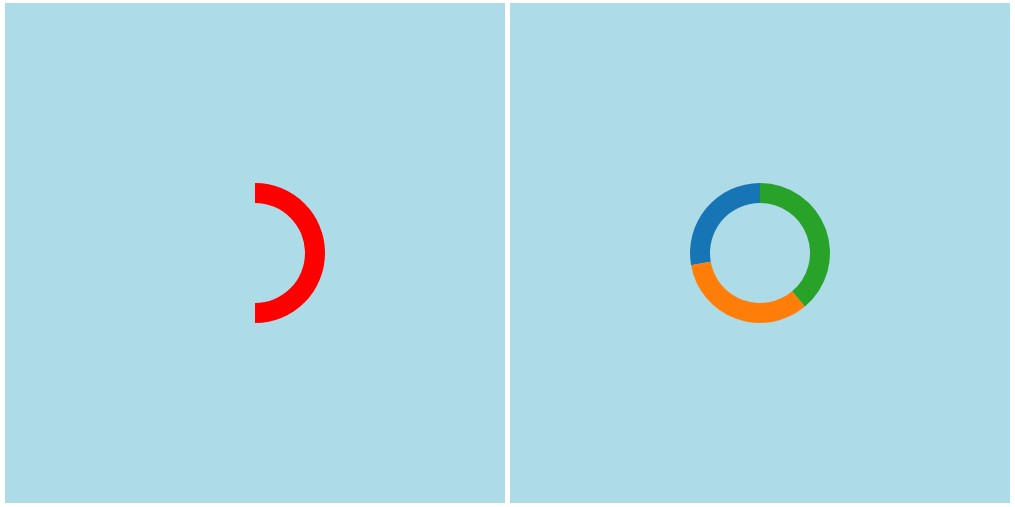
代码实现
1
2
3
4
5
6
7
8
9
10
11
12
13
14
15
16
17
18
19
20
21
22
23
24
25
26
27
28
29
30
31
32
33
34
35
36
37
38
39
40
41
42
43
44
45
46
47
48
49
50
51
52
53
54
55
56
57
58
59
60
61
62
63
64
65
66
67
68
69
70
71
72
73
74
75
76
77
78
79
80
| <!DOCTYPE html>
<meta charset="utf-8">
<head>
<title>Simple Circle Pack (d3 v4; CSV; 50 Lines)</title>
<script src="https://d3js.org/d3.v5.min.js"></script>
</head>
<style>
svg {
width: 500px;
height: 500px;
background-color: lightblue;
}
</style>
<svg id="arc"></svg>
<svg id="pie"></svg>
<script>
function drawArc()
{
let arc = d3.arc()
.startAngle(0)
.endAngle(Math.PI)
.innerRadius(50)
.outerRadius(70)
d3.select('#arc')
.append('path')
.attr('d', arc)
.attr('fill', (d, i) => {
return 'red'
})
.attr('transform', 'translate(250, 250)')
}
function drawPie()
{
let dataset = [5, 6, 7]
let pie = d3.pie()
let color = d3.scaleOrdinal(d3.schemeCategory10)
let arc = d3.arc()
.innerRadius(50)
.outerRadius(70)
let arcs = d3.select('#pie').selectAll('.arc')
.data(pie(dataset))
.enter()
.append('g')
.attr('class', 'arc')
.attr('transform', 'translate(250, 250)')
arcs.append('path')
.attr('d', arc)
.attr('fill', (d, i) => {
console.log(i, color(i));
return color(i)
})
}
drawArc()
drawPie()
</script>
|
注意事项
1、一定要对图形进行平移,因为图形默认是按照其所处的元素的(0, 0)为圆心的,不平移会导致图形只能画出来四分之一。
2、startAngle和endAngle的参数,不是直接写角度数值,而是通过PI常量进行计算。
圆的周长=2*PI*R,因此PI=180°,即半圆。